SAP Dashboard

MES in SAP - Manufacturing Execution System in SAP

X-NetMES Logo

Immediately see what is
going on in the production

With an MES in SAP.

Immediately see what is
going on in the production
With an SAP MES.

An MES in SAP means maximum data transparency without middleware and without interfaces. This way, an MES in SAP provides you with a true production management system from a single source.

SAP MES
SAP MES Popup

Production management with hurdles

Production companies often suffer from a lack of transparency, inefficient processes and unutilised potential. Important key figures for analysis are scattered or missing altogether and isolated software systems hinder the flow of information between production and ERP.

X-NetMES Logo

The solution: Our X-NetMES directly in SAP

Maximum Data Transparency
with our MES in SAP without interfaces.

Achieve transparency with an MES in SAP, identify waste, and implement targeted measures for sustainable improvement of your production.

Use the holistic database as the key to excellence.

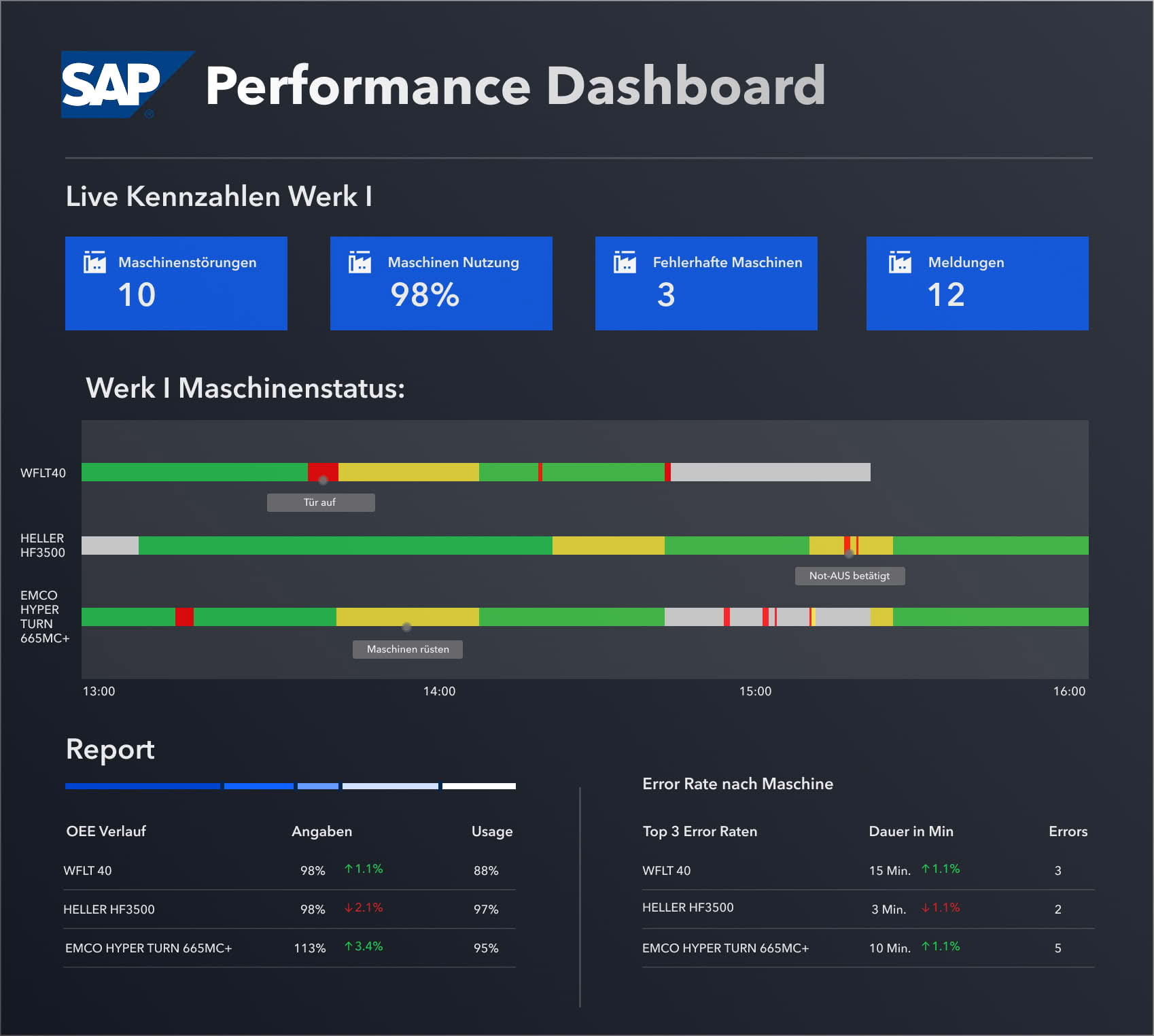
Online KPI Analysis with MES in SAP

Maintain an overview: Visualise KPIs on dashboards, analyse details by drilling down and configure customised Fiori cockpits for managers, area managers and workers. In X-NetMES Studio 4.0, the data from MES and ERP is available centrally for KPI analyses - so you can see at a glance what is working and what is not.

KPI

0 %

The Data in a
Single System

Our MES is directly integrated into SAP. This enables you to use the entire SAP data set for analyses and to identify opportunities and potential in a holistic way. Learn more about an MES System.

Identify Production Pain Points in the MES System in Just a Few Clicks

Pain points in production in just a few clicks

Know what is not working before it becomes a problem.

With our online status, you can keep an eye on your production at all times, make informed decisions and shorten response times - for proactive action and sustainable process optimisation.

SAP MES Painpoints

Optimum Scalability Thanks to Modular Design

Flexibility & scalability thanks to standard software with a modular structure.

Every production environment is unique — and that is exactly why your MES in SAP must grow with your requirements. Our MES system, X‑NetMES, offers maximum scalability through standard software with a modular architecture.

MES SAP Module

Full Control Through Open Coding of the MES in SAP

Define your workflows and specific processes in standard customising. Design optimal workflows with our experts and utilise the full potential. 100 % SAP ABAP, no middleware, fully integrated into your system landscape. SAP coding, user exits & transparent programme sequences - your in-house development can make adjustments independently.

SAP MES Coding

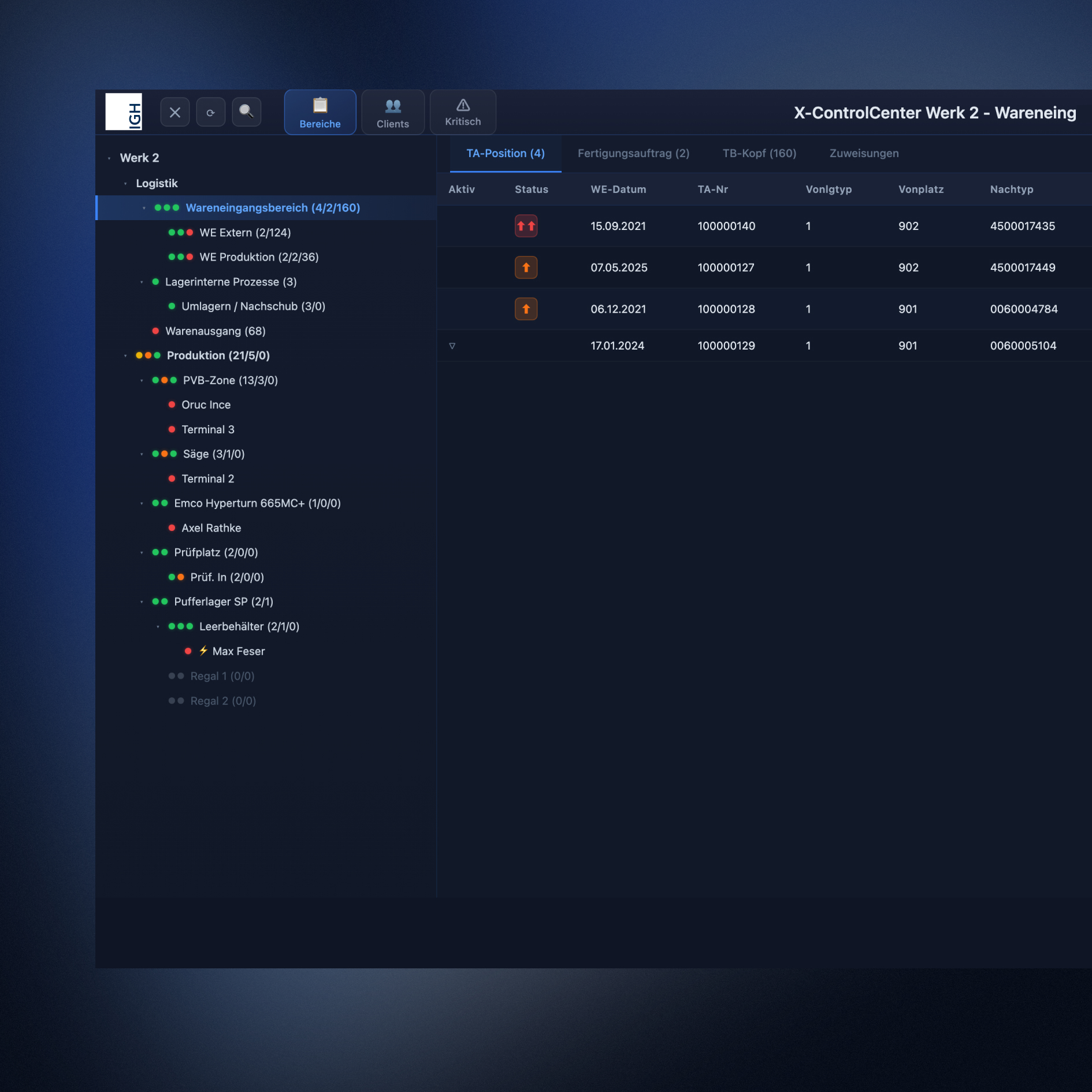
X-ControlCentre

Material at the right time in the right place

Digitised logistics in warehousing and production with the X-ControlCenter control station. Resources under control, no bottlenecks & full transparency – this is how material flow becomes efficient.

No waiting times with just-in-time logistics

Central control of transports via the control centre

Traceability with seamless processes

Modular design for optimal scalability

100% integrated into SAP

MES Directly in SAP

We Make Work-In-Process (WIP)
Material visible:

We make work-in-process (WIP) material visible in SAP:

MES SAP WIP Material

WIP material tracking on the shop floor. Maximum transparency. Minimise waste.

The right material flow, in the right place at the right time!

In manufacturing, efficient material supply determines productivity and profitability. However, if material between two processing steps (WIP material) is not recorded in the ERP system, inefficiencies, long search times and downtimes occur.

Rely on digital material tracking instead of paperwork.

Transparent - Digital - Efficient

Unique ID for each WIP material - Full traceability instead of searching.

Digital transport orders control transport processes - No bottlenecks, no delays.

Just-in-time material request - Optimised care in the workplace.

Automated storage with status updates - Production order, material & processing status always in view.

Centralised control via control station - Optimum utilisation of transport resources.

MES in SAP Aufgabenmanagement

Optimised processes with digital
Task Management

Optimized Processes with Digital Task Management in SAP MES

Coordinate individual tasks in the production and assembly online and with a system. The requirement profile on the shop floor is very individual and customised to the respective production, assembly or logistics area. 

Easily create individual task lists for your workers and logisticians and organise task queues. Set smart rules and optimise processing. All in one centralised, digital solution. Available as a standalone solution or integrated into the X-NetMES terminal.

Supply workstations with consumables such as cardboard boxes, adhesive tape, etc. 

Waste transport at workstations and in logistics (waste oil, shavings, paper).

Empties supply to the workstations with goods carriers, KLTs, boxes, etc. 

Internal pallet transport.

MES Directly in SAP

Expand Your SAP Processes

Our portfolio for your success – Our X-NetMES functions go beyond SAP functions

Production Data Acquisition

Record operating data such as personnel time, machine time or quantity in relation to the SAP order and SAP workstation.

Classic production data acquisition (PDA) in the MES system includes the registration of actual data for the order / process. The worker records his data in a browser dialogue on mobile or stationary terminals. All common order and activity types are supported:

- Production Orders (PP)
- Process Orders (PP-PI)
- Project System Orders (PS)
- Maintenance Orders (PM)
- Cost Centres / Internal Orders (CO)

The automatic calculation is performed by "starting and stopping" the activity types. Inputs and confirmations of good and scrap quantities are checked for plausibility.
The MES offers you the option of designing paperless workflows and providing stored documentation with worker guidance. Combine additional functions and achieve a high degree of automation during input (click optimisation).

Personnel Time Collection

Record the attendance time (coming - going - booking) and register your employees' peak and off-peak times.

Time Recording at the Workstation

Use the classic PDC functionality to record the accountable worker time according to the order and workstation. You can also use X-NetMES to record non-accountable services (non-productive times) and allocate these to the operational areas in a qualified manner.

Presence Time Terminal

Use the X-NetMES module for attendance time recording and booking directly in SAP HR or SAP HCM. 

Employees can record their attendance and absence status directly in the MES via a separate attendance time terminal. All common identification systems are supported (Legic, Mifare, etc.)

Machine Data Acquisition

Record the status of your machines and process equipment using direct machine communication.

Production – Set-up – Cleaning – Downtime or fault: our MES system records the machine status and posts the actual times to the SAP activity types. 

Get to the bottom of faults with qualified information and rectify problems sustainably. Record production quantities and accompanying process parameters directly via the interface to the machine or with additional information from the operator.

All machines are linked via:
- A signal converter that directly picks up the machine signals
- An OPC link that communicates with the machine control system
- An HTTP connection via which an individual communication link is established.

IGH standard procedure:

Utilise IGH standard procedures for machine connectivity and benefit from our expertise. Over 20,000 machines worldwide have already been connected using our MES software X-NetMES. Whether Simatic, Sinumeric, Heidenhain, Allen Bradley, GE-Fanuc, etc. – our team has a solution ready for you.

Quality Management

Worker self-inspection, incoming goods inspection or characteristic recording for the inspection lot... Quality data acquisition in production and assembly with the X-NetMES Q module.

Enable your workers to carry out an online inspection during production directly in SAP. Similar to the QM inspection lot, the worker records the quantitative and qualitative inspection characteristics on the X-NetMES terminal. A dynamic workflow, derived from the SAP inspection plan, guarantees an ergonomic process.

Our MES offers the option of connecting digital measuring equipment. There are also interfaces to complex testing systems.

Material Management

Book component consumption in production and assembly directly in SAP. Record material data such as batches and/or serial numbers and thus guarantee seamless traceability in production and logistics.

In the context of traceability, it is important to know which input material was used in which output material. The input batch is a component of the output batch. Retrograde bookings are prone to errors and a batch specification can slow down the material flow.

Our MES system, X-NetMES

It has a workflow for the consumption-based recording and booking of materials used. The worker registers the batch (component) used and the quantity, and the booking is made directly to the SAP order.

Another feature of our MES Production Software is the recording of serial numbers. Here, too, the operator records the individual parts in a simple workflow and assigns them to an object.

Thanks to X-NetMES, you can avoid lengthy and error-prone write-ups and the subsequent manual transfer of data to the SAP system.

Maintenance

Increase the availability of your technical equipment and the efficiency of your maintenance. Maximise value-adding time and increase your competitiveness with high system availability. 

Troubleshooting, Maintenance and Servicing

Organise your work online with X-NetMES PM, based on the SAP PM module. Trigger maintenance notifications and maintenance orders automatically via machine connectivity or the MES terminal. Thanks to the full integration of this functionality into the MES software, SAP order and work centre data can be documented. Manage your work using a personalised and optimised worklist on mobile apps. Record services directly on maintenance orders and let your teams book repair materials in SAP via mobile devices.

Maintenance Directly in SAP 

Stand-alone or fully integrated into the X-NetMES terminal workflow.

APS-Connection

Incorrect master data will inevitably lead to poor planning. Shit in - Shit out! Use our MES in SAP and bring quality to your master data.  

Our MES system, XNetMES, uses real-time feedback from the production process to create the master data foundation for a detailed production planning tool (APS). By recording time on a job-by-job basis in line with actual usage, you ensure that each job is charged precisely for the services it has actually incurred. Use target-actual comparisons to continuously refine your targets and achieve the optimal utilisation of limited resources.

Bring the Planning to the Worker

With the online process list in the MES terminal, the current planning from SAP is clearly available to the worker at all times. If the plan changes, this change is also immediately visible in the terminal. Act instead of react - control your production paperlessly. 

Online KPIs in X-NetMES Studio 4.0 

Online data analysis and reporting with our MES in SAP. With X-NetMES Studio 4.0, you have access to all relevant key performance indicators at any time – in real time and fully integrated into SAP.

Data transparency in production is the key to well-founded decisions and efficient production. With X-NetMES Studio 4.0, the powerful analysis and reporting tool, you can design production processes, identify bottlenecks at an early stage and make targeted use of optimisation potential. Studio 4.0 provides the necessary data basis for quick, precise decisions, especially during shift handovers and shop floor meetings. In addition to extensive standard evaluations, reports and industry-typical KPIs, it is also possible to define specific key figures in customising using a formula editor. Configure specific Fiori cockpits for your managers, area managers and workers using a comprehensive authorisation concept. 

Icon
Icon

MES in SAP in Just a Few Steps

MES in SAP Integration

01. Target Definition and Project Scope

What goals are you pursuing? In which areas would you like to digitalise processes?

At the beginning of a project, we work with you to jointly define the project scope and the goals you want to achieve through digitalization—identifying the potential value along the way. We focus on transparency, efficiency, seamless integration into your SAP system or a stand‑alone solution, and a fast return on investment (ROI). 

MES SAP Terminal

02. Process Analysis and KPI Definition

In a process analysis, we work out which parameters are important for your specific application. How can we optimise and how can we achieve transparency? Together, we define relevant key performance indicators (KPIs) such as OEE, productivity and performance. These standard KPIs enable a well-founded assessment of production performance and form the basis for your sustainable improvements.

MES SAP Dashboard

03. Concept Development and Resource Planning

How do you achieve your goals? In workshops with our joint team of experts, we develop a trend-setting concept including a cost estimate and detailed time and resource planning. Our approach is a pragmatic implementation that utilises the greatest levers first and creates added value quickly.

Terminal Maschine Fertigung

04. MES in SAP Integration and Machine Connectivity

Our SAP MES, X‑NetMES, is fully integrated into SAP, uses existing master data, and prevents duplicate data management. During the course of the project, it is embedded into your system landscape and implemented with a basic configuration based on initial process templates. Machine connectivity is realized via standards such as OPC UA, MQTT, or web services—without the need for additional servers or databases. We support you through go‑live and the subsequent hypercare phase. Our MES software can also be deployed as a stand‑alone solution.

Heller Produktion

05. Real-Time Data Analytics & Reporting with MES in SAP

X-NetMES Studio 4.0 provides you with Fiori apps for cross-location analyses in real time. This enables data-based decisions for shift handovers, shop floor meetings and long-term process optimisation. You now have access to online data from production and assembly and can identify your weak points in the process. With the KPIs and standard reports, you achieve complete transparency and thus create the basis for continuous improvement measures.

MES SAP Dashboard

06. Scalable System Configuration and Roll-Out

Thanks to its modular structure, SAP MES X‑NetMES can be scaled precisely to meet your production requirements. You start with the core functionalities and expand the system step by step. This allows you to respond flexibly to new requirements. Using the X‑NetMES configuration, you can bring additional workstations, locations, and functional modules into operation. Roll out process templates and standard workflows across sites and benefit from consistent, harmonized processes throughout your global production network.

MES Production Software Beratung

07. Detailed Production Planning and Costing

Times recorded with SAP MES X‑NetMES are reported directly back to SAP, ensuring that the production order reflects the exact costs incurred. This creates full transparency for direct and indirect manufacturing costs and improves the accuracy of your cost calculations. Precise standard and setup times are also critical for production planning. Our SAP MES, X‑NetMES, provides reliable master and order data to support well‑founded planning and efficient production control within the SAP PP/PI module.

MES SAP Feinplanung

08. Continuous Improvement and Future-Proofing

Success requires continuous improvement—and that begins with transparency. With X‑NetMES, you establish the foundation for sustainable shopfloor excellence. Optimized master data, integrated AI tools, and seamless SAP integration ensure stable and efficient processes. At the same time, our MES system X‑NetMES is release‑safe for SAP S//4HANA, built on the UI5 Fiori framework, and leverages the Business Technology Platform (BTP) to enable future‑proof, real‑time production monitoring.

MES in SAP KVP
Icon

X-NetMES References

Customer Testimonials

Customer Testimonials

Exclusive Insights into Our SAP MES

Case Studies

Icon
Icon

Ready to finally control your production in real-time with an MES in SAP?

Event Highlights for Our SAP MES

Upcoming Event

Upcoming Highlight

Overview - MES Directly in SAP

Online
15.07.2026

SAP MES FAQ

Frequently asked questions

Here you will find frequently asked questions about SAP MES. Find out how an MES in SAP optimises your production processes, boosts efficiency and gives you greater control over your manufacturing operations.

An SAP MES (Manufacturing Execution System in SAP) is a production control system that is directly integrated with SAP ERP or SAP S/4HANA. Its purpose is to control, monitor, and document production processes in real-time. An SAP MES connects the operative level of manufacturing (machines, employees, orders) with the business processes in the SAP system, thus ensuring transparency, traceability, and efficient production workflows.

An MES in SAP handles key tasks in production control and monitoring. These include, amongst other things, the collection of machine and process data, the confirmation of production orders, the monitoring of lead times, the calculation of key performance indicators such as OEE, and ensuring the traceability of materials. Direct SAP integration prevents data silos, and production data is available in the SAP system in real time.

The key difference lies in integration. An SAP MES is directly embedded within the SAP system landscape and operates without the need for additional interfaces or middleware. Traditional MES systems are often external solutions that must be connected to SAP via interfaces. An MES within SAP therefore reduces complexity, data redundancy and integration effort, and enables a seamless, consistent data foundation from the shop floor right through to the ERP system.

X-NetMES differs from other SAP MES solutions primarily through its full integration directly into SAP. It requires no interfaces, middleware or external databases. All production, machine and process data is processed and stored directly within the SAP system. This creates a seamless, integrated database without any media breaks or data redundancies. This reduces complexity, simplifies the system landscape and ensures maximum transparency and stability in production.